<?xml version="1.0" encoding="utf-8"?><feed xmlns="http://www.w3.org/2005/Atom" ><generator uri="https://jekyllrb.com/" version="3.10.0">Jekyll</generator><link href="https://jjyyy-jjy.github.io/feed.xml" rel="self" type="application/atom+xml" /><link href="https://jjyyy-jjy.github.io/" rel="alternate" type="text/html" /><updated>2026-04-29T04:05:17+00:00</updated><id>https://jjyyy-jjy.github.io/feed.xml</id><title type="html">Junye Ji | Research Engineering Portfolio</title><subtitle>Formal methods, reproducible benchmarks, and research-engineering notes by Junye Ji.</subtitle><entry><title type="html">Building a Reproducible Sparse Matrix Benchmark on Hyak</title><link href="https://jjyyy-jjy.github.io/systems/2026/04/26/Building-a-Reproducible-Sparse-Matrix-Benchmark-on-Hyak.html" rel="alternate" type="text/html" title="Building a Reproducible Sparse Matrix Benchmark on Hyak" /><published>2026-04-26T00:00:00+00:00</published><updated>2026-04-26T00:00:00+00:00</updated><id>https://jjyyy-jjy.github.io/systems/2026/04/26/Building-a-Reproducible-Sparse-Matrix-Benchmark-on-Hyak</id><content type="html" xml:base="https://jjyyy-jjy.github.io/systems/2026/04/26/Building-a-Reproducible-Sparse-Matrix-Benchmark-on-Hyak.html"><![CDATA[<div class="post-lang-switch" aria-label="Article language" style="margin: 1rem 0 2rem; padding: 0.75rem 1rem; border: 1px solid #e5e7eb; border-radius: 6px; font-size: 0.95rem;">
  <span style="font-weight: 600;">Language:</span>
  <span aria-current="true" style="margin-left: 0.5rem; font-weight: 600;">EN</span>
  <span style="color: #9ca3af; margin: 0 0.35rem;">/</span>
  <a href="/zh/systems/2026/04/26/Building-a-Reproducible-Sparse-Matrix-Benchmark-on-Hyak.html">中文</a>
</div>

<p>SparseBench++ started as a correctness-first sparse matrix benchmark harness, not as a claim that a new SpMV kernel would immediately beat mature libraries. The first useful goal was narrower and more valuable: take a C++ CSR SpMV implementation from tiny checked-in fixtures to real SuiteSparse inputs on Hyak, the University of Washington research computing cluster, without losing track of what was actually run.</p>

<p>That framing mattered because performance numbers are easy to overstate. A fast-looking benchmark is not useful if the data path is unclear, the batch job silently used a fallback matrix, or the result directory cannot be tied back to a commit. The project now has a traceable path from parser tests to Slurm jobs, CSV output, analysis summaries, and report figures.</p>

<h2 id="from-tiny-fixtures-to-real-matrices">From Tiny Fixtures To Real Matrices</h2>

<p>The first fixtures were deliberately small Matrix Market files under <code class="language-plaintext highlighter-rouge">data/tiny/</code>. They made parser behavior easy to test and kept local CTest runs cheap. That mattered later: when the Slurm mechanics were working, the SuiteSparse downloader exposed the real parser boundary. The first small SuiteSparse set was not just <code class="language-plaintext highlighter-rouge">coordinate real general</code>.</p>

<p>That pushed the parser from the original narrow format into the current v0.1.1 coverage:</p>

<ul>
  <li><code class="language-plaintext highlighter-rouge">coordinate real general</code></li>
  <li><code class="language-plaintext highlighter-rouge">coordinate integer general</code></li>
  <li><code class="language-plaintext highlighter-rouge">coordinate pattern general</code></li>
  <li><code class="language-plaintext highlighter-rouge">coordinate real symmetric</code></li>
</ul>

<p>Unsupported Matrix Market variants still fail instead of being silently misread. That is less glamorous than accepting everything, but it is the right default for a benchmark harness. Wrong input handling contaminates every timing number downstream, and a benchmark harness should make that kind of failure loud.</p>

<h2 id="slurm-as-a-gate-not-just-a-launcher">Slurm As A Gate, Not Just A Launcher</h2>

<p>The Hyak scripts evolved into gates, not just launchers. The real benchmark jobs validate the manifest, refuse <code class="language-plaintext highlighter-rouge">diag5.mtx</code> fallback input, build on compute nodes, run CTest, and only then emit CSVs.</p>

<p>For the medium scaling pass, the manifest was:</p>

<div class="language-text highlighter-rouge"><div class="highlight"><pre class="highlight"><code>/gscratch/scrubbed/junyej/sparsebench/data/medium_matrices.txt
</code></pre></div></div>

<p>It contained six SuiteSparse matrices: <code class="language-plaintext highlighter-rouge">cant</code>, <code class="language-plaintext highlighter-rouge">consph</code>, <code class="language-plaintext highlighter-rouge">cop20k_A</code>, <code class="language-plaintext highlighter-rouge">mac_econ_fwd500</code>, <code class="language-plaintext highlighter-rouge">mc2depi</code>, and <code class="language-plaintext highlighter-rouge">pdb1HYS</code>. That same manifest is now the controlled input for both the 96-core SparseBench scaling run and the 32-core Eigen comparison.</p>

<h2 id="96-core-sparsebench-scaling">96-Core SparseBench Scaling</h2>

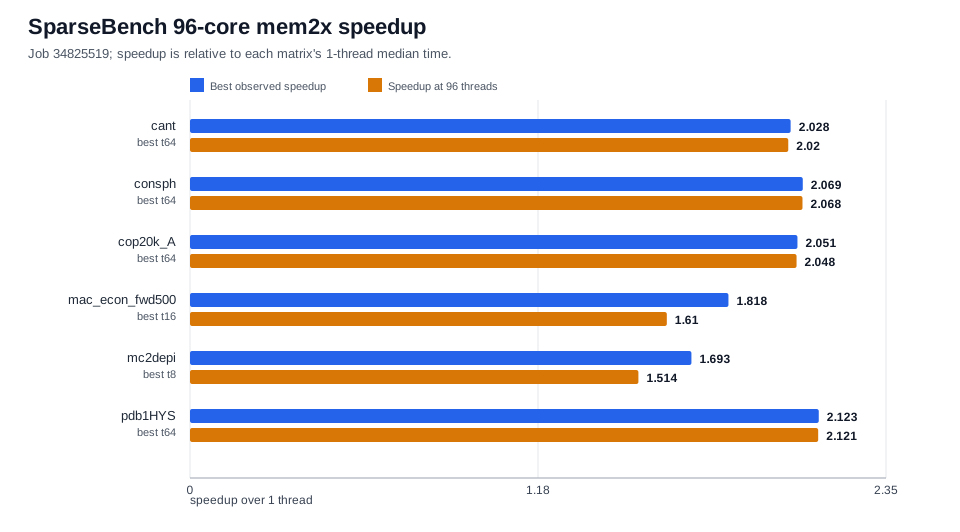
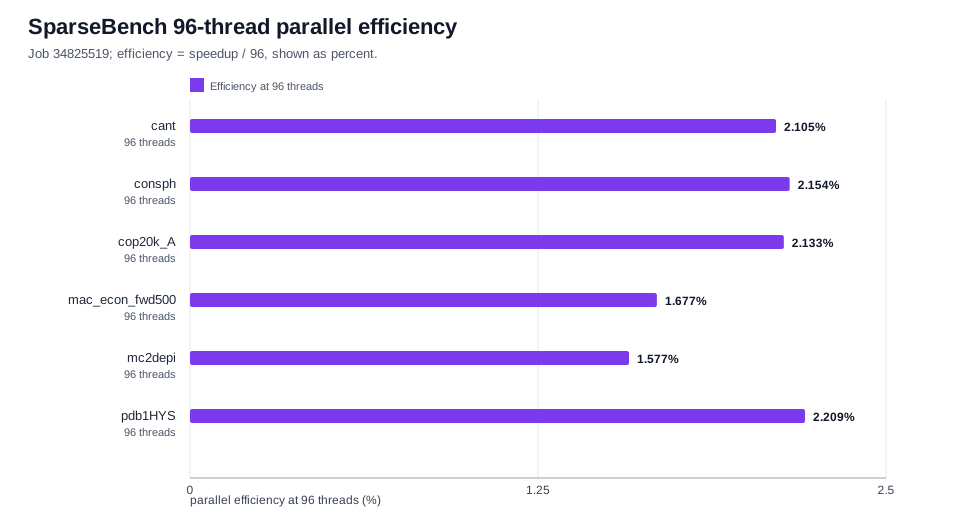
<p>Job <code class="language-plaintext highlighter-rouge">34825519</code> ran the SparseBench CSR SpMV path on <code class="language-plaintext highlighter-rouge">cpu-g2-mem2x</code> with 96 allocated CPUs and thread counts <code class="language-plaintext highlighter-rouge">1,2,4,8,16,32,64,96</code>. It completed with CTest <code class="language-plaintext highlighter-rouge">3/3</code>, empty stderr, and 48 CSV files.</p>

<p><img src="/assets/images/sparsebench/mem2x_34825519_speedup.svg" alt="SparseBench 96-core mem2x speedup" /></p>

<p><img src="/assets/images/sparsebench/mem2x_34825519_efficiency.svg" alt="SparseBench 96-thread parallel efficiency" /></p>

<p>The result is useful, but it is not a linear-scaling story. Best observed speedups ranged from <code class="language-plaintext highlighter-rouge">1.693x</code> to <code class="language-plaintext highlighter-rouge">2.123x</code>, and every matrix peaked before 96 threads. The efficiency plot makes the same point from another angle: this CSR SpMV path is dominated by memory traffic and sparsity-pattern effects, not floating-point throughput.</p>

<p>The important result for this stage is more mechanical than glamorous. The same build, test, manifest, and CSV pipeline can now carry future experiments without asking readers to trust an informal spreadsheet.</p>

<h2 id="adding-a-real-baseline">Adding A Real Baseline</h2>

<p>After the SparseBench-only scaling run, the next useful question was not whether SparseBench was “fast” in isolation. It was how the current implementation compared with an established sparse backend on the same inputs, under the same manifest discipline.</p>

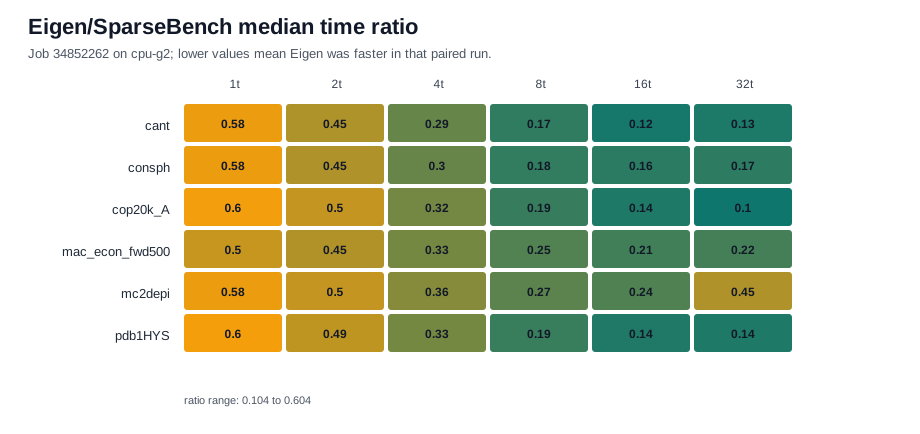
<p>Job <code class="language-plaintext highlighter-rouge">34852262</code> added an Eigen baseline on <code class="language-plaintext highlighter-rouge">cpu-g2</code>. It built with <code class="language-plaintext highlighter-rouge">SPARSEBENCH_USE_EIGEN=ON</code>, loaded <code class="language-plaintext highlighter-rouge">cesg/eigen/3.3.9</code>, ran both backends on the same six matrices, and produced 72 paired CSV files across thread counts <code class="language-plaintext highlighter-rouge">1,2,4,8,16,32</code>.</p>

<p><img src="/assets/images/sparsebench/eigen_34852262_time_ratio.svg" alt="Eigen/SparseBench median time ratio" /></p>

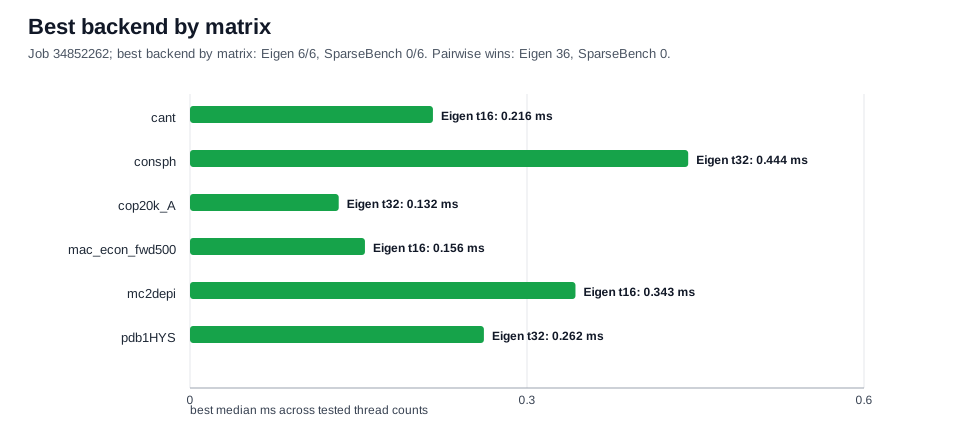
<p>In that run, Eigen won all <code class="language-plaintext highlighter-rouge">36/36</code> paired matrix/thread comparisons. That is a useful engineering signal, not a defeat. It says the current SparseBench path is now stable enough to compare honestly, and it gives a concrete optimization target instead of a vague feeling that the kernel should be faster.</p>

<p><img src="/assets/images/sparsebench/eigen_34852262_best_backend.svg" alt="Best backend by matrix" /></p>

<p>The Eigen run is intentionally labeled as a 32-core <code class="language-plaintext highlighter-rouge">cpu-g2</code> comparison. It is not evidence for the pending 192-core <code class="language-plaintext highlighter-rouge">cpu-g2-mem2x</code> probe, and its absolute times should not be mixed with the separate mem2x scaling job.</p>

<h2 id="what-is-still-pending">What Is Still Pending</h2>

<p>The 192-core probe is job <code class="language-plaintext highlighter-rouge">34851174</code>. It is still pending with <code class="language-plaintext highlighter-rouge">QOSGrpCpuLimit</code>, has no allocation, and has produced no result CSVs. It should stay out of benchmark claims until it completes and passes the same checks: Slurm <code class="language-plaintext highlighter-rouge">COMPLETED 0:0</code>, clean stderr, CTest, and the expected matrix/thread coverage.</p>

<h2 id="what-comes-next">What Comes Next</h2>

<p>The immediate next step is preservation: the <code class="language-plaintext highlighter-rouge">34852262</code> Eigen evidence lives under <code class="language-plaintext highlighter-rouge">/gscratch/scrubbed</code>, which is disposable scratch. It should be packaged or mirrored before that storage is cleaned.</p>

<p>After that, the path is clear:</p>

<ol>
  <li>Keep tracking the 192-core probe and report it only if it completes cleanly.</li>
  <li>Add more external baselines once Eigen is stable.</li>
  <li>Use the current report pipeline for future figures instead of hand-copying raw data.</li>
  <li>Delay CG and Lanczos until the SpMV reporting workflow is boring and repeatable.</li>
</ol>

<p>That is the main lesson from this pass: the project is still small, and Eigen is currently faster on the measured comparisons, but the evidence chain is now strong enough to build on. That is the part I wanted from this stage.</p>]]></content><author><name></name></author><category term="systems" /><summary type="html"><![CDATA[A scoped SparseBench case study from Matrix Market fixtures to Hyak jobs, CSV artifacts, 96-core scaling, and an Eigen baseline.]]></summary></entry><entry><title type="html">在 Hyak 上构建可复现的稀疏矩阵基准</title><link href="https://jjyyy-jjy.github.io/zh/systems/2026/04/26/Building-a-Reproducible-Sparse-Matrix-Benchmark-on-Hyak.html" rel="alternate" type="text/html" title="在 Hyak 上构建可复现的稀疏矩阵基准" /><published>2026-04-26T00:00:00+00:00</published><updated>2026-04-26T00:00:00+00:00</updated><id>https://jjyyy-jjy.github.io/zh/systems/2026/04/26/SparseBench-Hyak-Reproducible-Sparse-Matrix-Benchmark-zh</id><content type="html" xml:base="https://jjyyy-jjy.github.io/zh/systems/2026/04/26/Building-a-Reproducible-Sparse-Matrix-Benchmark-on-Hyak.html"><![CDATA[<div class="post-lang-switch" aria-label="文章语言" style="margin: 1rem 0 2rem; padding: 0.75rem 1rem; border: 1px solid #e5e7eb; border-radius: 6px; font-size: 0.95rem;">
  <span style="font-weight: 600;">语言：</span>
  <a href="/systems/2026/04/26/Building-a-Reproducible-Sparse-Matrix-Benchmark-on-Hyak.html" style="margin-left: 0.5rem;">EN</a>
  <span style="color: #9ca3af; margin: 0 0.35rem;">/</span>
  <span aria-current="true" style="font-weight: 600;">中文</span>
</div>

<p>SparseBench++ 一开始是一个正确性优先的稀疏矩阵基准测试框架，而不是一个急着声称新 SpMV kernel 比成熟库更快的项目。第一个有用目标更窄，也更实际：把一个 C++ CSR SpMV 实现，从仓库内的小型测试矩阵推进到华盛顿大学研究计算集群 Hyak 上的真实 SuiteSparse 输入，同时不丢失到底运行了什么的证据链。</p>

<p>这个定位很重要，因为性能数字很容易被讲过头。如果数据路径不清楚，批处理作业悄悄用了 fallback 矩阵，或者结果目录无法追溯到某个 commit，那么看起来很快的 benchmark 也没有什么价值。现在这个项目已经有了一条可追踪路径：从 parser 测试，到 Slurm 作业，到 CSV 输出，到分析摘要，再到报告图表。</p>

<h2 id="从小型测试矩阵到真实矩阵">从小型测试矩阵到真实矩阵</h2>

<p>最早的测试数据是 <code class="language-plaintext highlighter-rouge">data/tiny/</code> 下刻意做得很小的 Matrix Market 文件。它们让 parser 行为容易验证，也让本地 CTest 保持便宜。这个选择后来很有用：等 Slurm 流程跑通之后，SuiteSparse 下载器暴露了真正的 parser 边界。第一批小型 SuiteSparse 矩阵并不全是 <code class="language-plaintext highlighter-rouge">coordinate real general</code>。</p>

<p>这推动 parser 从最初的窄格式扩展到当前 v0.1.1 覆盖范围：</p>

<ul>
  <li><code class="language-plaintext highlighter-rouge">coordinate real general</code></li>
  <li><code class="language-plaintext highlighter-rouge">coordinate integer general</code></li>
  <li><code class="language-plaintext highlighter-rouge">coordinate pattern general</code></li>
  <li><code class="language-plaintext highlighter-rouge">coordinate real symmetric</code></li>
</ul>

<p>不支持的 Matrix Market 变体仍然会失败，而不是被静默误读。这不如“什么都支持”听起来漂亮，但对 benchmark 框架来说是正确默认值。错误的输入处理会污染后续每一个计时数字，而这种失败应该尽早、明确地暴露出来。</p>

<h2 id="slurm-是-gate不只是-launcher">Slurm 是 gate，不只是 launcher</h2>

<p>Hyak 脚本逐渐变成了 gate，而不只是 launcher。真正的 benchmark 作业会验证 manifest，拒绝 <code class="language-plaintext highlighter-rouge">diag5.mtx</code> fallback 输入，在计算节点上构建，运行 CTest，然后才输出 CSV。</p>

<p>中等规模 scaling 运行使用的 manifest 是：</p>

<div class="language-text highlighter-rouge"><div class="highlight"><pre class="highlight"><code>/gscratch/scrubbed/junyej/sparsebench/data/medium_matrices.txt
</code></pre></div></div>

<p>它包含六个 SuiteSparse 矩阵：<code class="language-plaintext highlighter-rouge">cant</code>、<code class="language-plaintext highlighter-rouge">consph</code>、<code class="language-plaintext highlighter-rouge">cop20k_A</code>、<code class="language-plaintext highlighter-rouge">mac_econ_fwd500</code>、<code class="language-plaintext highlighter-rouge">mc2depi</code> 和 <code class="language-plaintext highlighter-rouge">pdb1HYS</code>。同一个 manifest 现在同时作为 96-core SparseBench scaling run 和 32-core Eigen comparison 的受控输入。</p>

<h2 id="96-core-sparsebench-scaling">96-core SparseBench scaling</h2>

<p>Job <code class="language-plaintext highlighter-rouge">34825519</code> 在 <code class="language-plaintext highlighter-rouge">cpu-g2-mem2x</code> 上运行 SparseBench CSR SpMV 路径，分配了 96 个 CPU，线程数为 <code class="language-plaintext highlighter-rouge">1,2,4,8,16,32,64,96</code>。它完成时 CTest 为 <code class="language-plaintext highlighter-rouge">3/3</code>，stderr 为空，并产生了 48 个 CSV 文件。</p>

<p><img src="/assets/images/sparsebench/mem2x_34825519_speedup.svg" alt="SparseBench 96-core mem2x speedup" /></p>

<p><img src="/assets/images/sparsebench/mem2x_34825519_efficiency.svg" alt="SparseBench 96-thread parallel efficiency" /></p>

<p>这个结果有价值，但它不是一个线性 scaling 的故事。最佳观测 speedup 范围是 <code class="language-plaintext highlighter-rouge">1.693x</code> 到 <code class="language-plaintext highlighter-rouge">2.123x</code>，而且每个矩阵都在 96 线程之前达到峰值。efficiency 图从另一个角度说明了同一件事：这个 CSR SpMV 路径主要受内存流量和稀疏模式影响，而不是受浮点吞吐限制。</p>

<p>这个阶段最重要的结果不是“速度故事”本身，而是 benchmark 路径在机械流程上已经成立。同一套 build、test、manifest 和 CSV pipeline 现在可以承载后续实验，而不需要读者相信某个手工整理的表格。</p>

<h2 id="加入一个真实-baseline">加入一个真实 baseline</h2>

<p>在 SparseBench-only scaling 运行之后，下一个有用问题并不是 SparseBench 单独看起来是否“快”。更有意义的问题是：在同一套 manifest discipline 下，当前实现和一个成熟 sparse backend 在同一批输入上相比如何。</p>

<p>Job <code class="language-plaintext highlighter-rouge">34852262</code> 在 <code class="language-plaintext highlighter-rouge">cpu-g2</code> 上加入了 Eigen baseline。它使用 <code class="language-plaintext highlighter-rouge">SPARSEBENCH_USE_EIGEN=ON</code> 构建，加载 <code class="language-plaintext highlighter-rouge">cesg/eigen/3.3.9</code>，在同六个矩阵上运行两个 backend，并针对线程数 <code class="language-plaintext highlighter-rouge">1,2,4,8,16,32</code> 产生了 72 个成对 CSV 文件。</p>

<p><img src="/assets/images/sparsebench/eigen_34852262_time_ratio.svg" alt="Eigen/SparseBench median time ratio" /></p>

<p>在这次运行中，Eigen 赢下了全部 <code class="language-plaintext highlighter-rouge">36/36</code> 个矩阵/线程组合的 median-time 对比。这是一个有用的工程信号，不是失败。它说明当前 SparseBench 路径已经足够稳定，可以进行诚实对比，也给出了具体的优化目标，而不是停留在“应该还能更快”的感觉上。</p>

<p><img src="/assets/images/sparsebench/eigen_34852262_best_backend.svg" alt="Best backend by matrix" /></p>

<p>Eigen 运行被明确标记为 32-core <code class="language-plaintext highlighter-rouge">cpu-g2</code> comparison。它不是待完成的 192-core <code class="language-plaintext highlighter-rouge">cpu-g2-mem2x</code> probe 的证据，它的绝对时间也不应该和单独的 mem2x scaling job 混在一起解释。</p>

<h2 id="仍然-pending-的内容">仍然 pending 的内容</h2>

<p>192-core probe 是 job <code class="language-plaintext highlighter-rouge">34851174</code>。它仍然因为 <code class="language-plaintext highlighter-rouge">QOSGrpCpuLimit</code> 处于 pending 状态，没有 allocation，也没有产生结果 CSV。在它完成并通过同样检查之前，不应该把它纳入 benchmark claim。这些检查包括：Slurm <code class="language-plaintext highlighter-rouge">COMPLETED 0:0</code>、干净的 stderr、CTest，以及预期的矩阵/线程覆盖。</p>

<h2 id="下一步">下一步</h2>

<p>最直接的下一步是保存证据：<code class="language-plaintext highlighter-rouge">34852262</code> Eigen evidence 位于 <code class="language-plaintext highlighter-rouge">/gscratch/scrubbed</code>，这是会被清理的 scratch 空间。它应该在存储被清理前被打包或镜像。</p>

<p>之后路径很清楚：</p>

<ol>
  <li>持续跟踪 192-core probe，并且只在它干净完成后报告。</li>
  <li>在 Eigen 路径稳定后，加入更多外部 baseline。</li>
  <li>继续使用当前 report pipeline 生成未来图表，而不是手动复制 raw data。</li>
  <li>等 SpMV 报告流程变得稳定且可重复之后，再推进 CG 和 Lanczos。</li>
</ol>

<p>这次工作的主要经验是：项目还很小，Eigen 在当前 measured comparisons 里更快，但证据链已经足够扎实，可以继续在其上构建。这正是这个阶段最需要拿到的结果。</p>]]></content><author><name></name></author><category term="systems" /><summary type="html"><![CDATA[从 Matrix Market 小样例到 Hyak 作业、CSV artifact、96-core scaling 和 Eigen baseline 的 SparseBench case study。]]></summary></entry><entry><title type="html">Building an All-in-One Air Quality Monitor for About $30</title><link href="https://jjyyy-jjy.github.io/diy/2025/12/06/DIY-Air-Quality-Monitor.html" rel="alternate" type="text/html" title="Building an All-in-One Air Quality Monitor for About $30" /><published>2025-12-06T02:16:00+00:00</published><updated>2025-12-06T02:16:00+00:00</updated><id>https://jjyyy-jjy.github.io/diy/2025/12/06/DIY-Air-Quality-Monitor</id><content type="html" xml:base="https://jjyyy-jjy.github.io/diy/2025/12/06/DIY-Air-Quality-Monitor.html"><![CDATA[<p><img src="/images/IMG_1051.jpg" alt="hero shot" /></p>

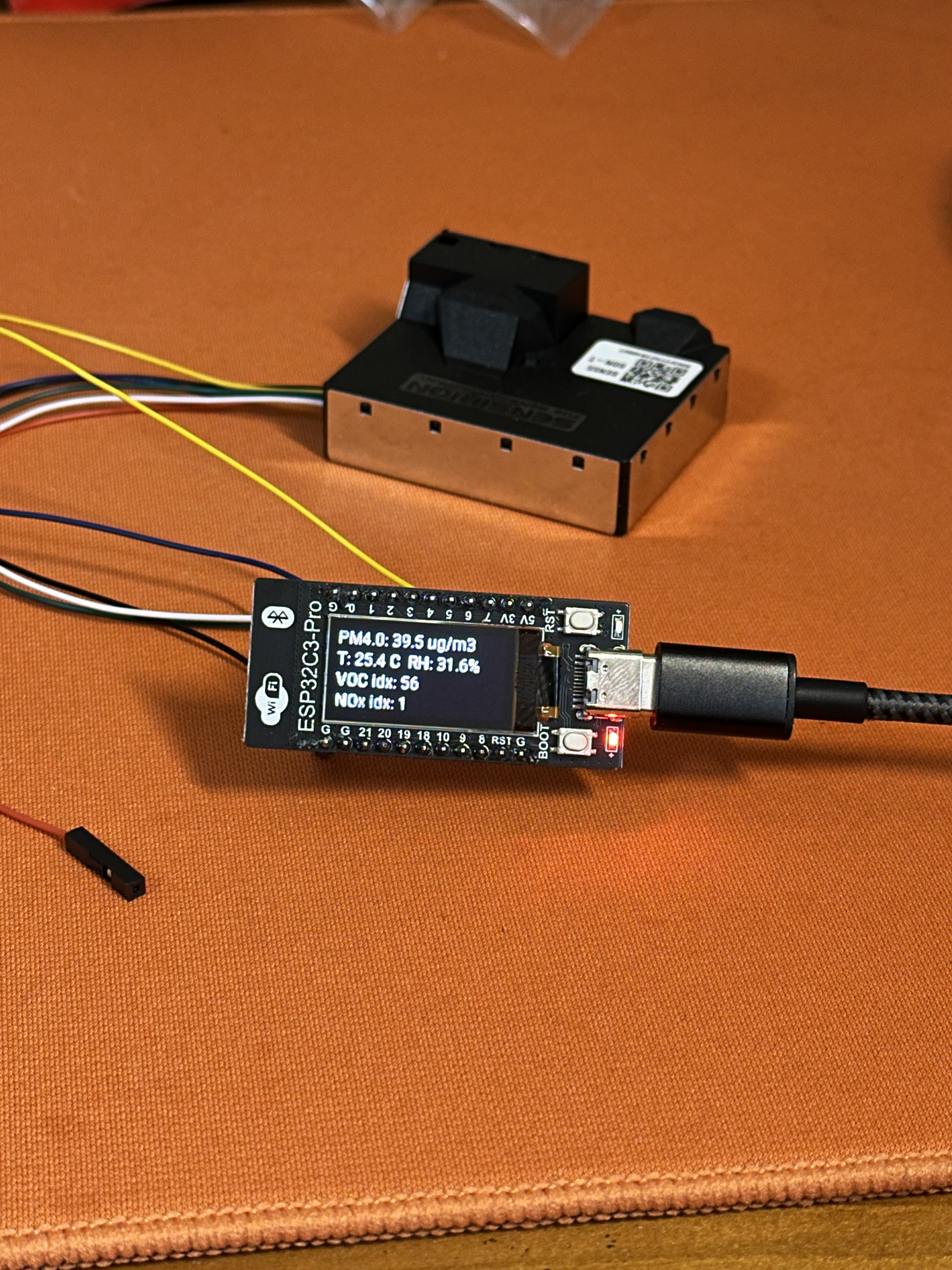
<p>I wanted a small indoor air-quality monitor that showed more than PM2.5. Temperature and humidity are useful, but I also wanted VOC and NOx indices because those are the numbers that change quickly when cooking, cleaning, ventilating, or leaving a room closed for too long.</p>

<p>The second requirement was integration. A standalone display is nice, but the data becomes more useful when Home Assistant can graph it over time. Commercial monitors with this combination of sensors and dashboard integration often cost much more than I wanted to spend, so I built a compact version around <strong>ESP32-C3 + SEN55 + ESPHome</strong>.</p>

<p>This write-up records the build as it happened: parts, wiring, ESPHome YAML, the display logic, and the debugging path for the OLED “black screen” issue. The goal is not lab-grade measurement; it is a cheap, inspectable monitor that makes indoor trends visible.</p>

<h2 id="1-hardware-selection">1. Hardware Selection</h2>

<h3 id="a-the-controller-esp32c3-pro-development-board">A. The Controller: ESP32C3-PRO Development Board</h3>

<p>I used a generic ESP32-C3 development board from an online marketplace.</p>

<ul>
  <li>
    <p><strong>Chip:</strong> ESP32-C3 (RISC-V, Wi-Fi + Bluetooth).</p>
  </li>
  <li>
    <p><strong>Onboard:</strong> USB-C for power/flashing, BOOT/RESET buttons.</p>
  </li>
  <li>
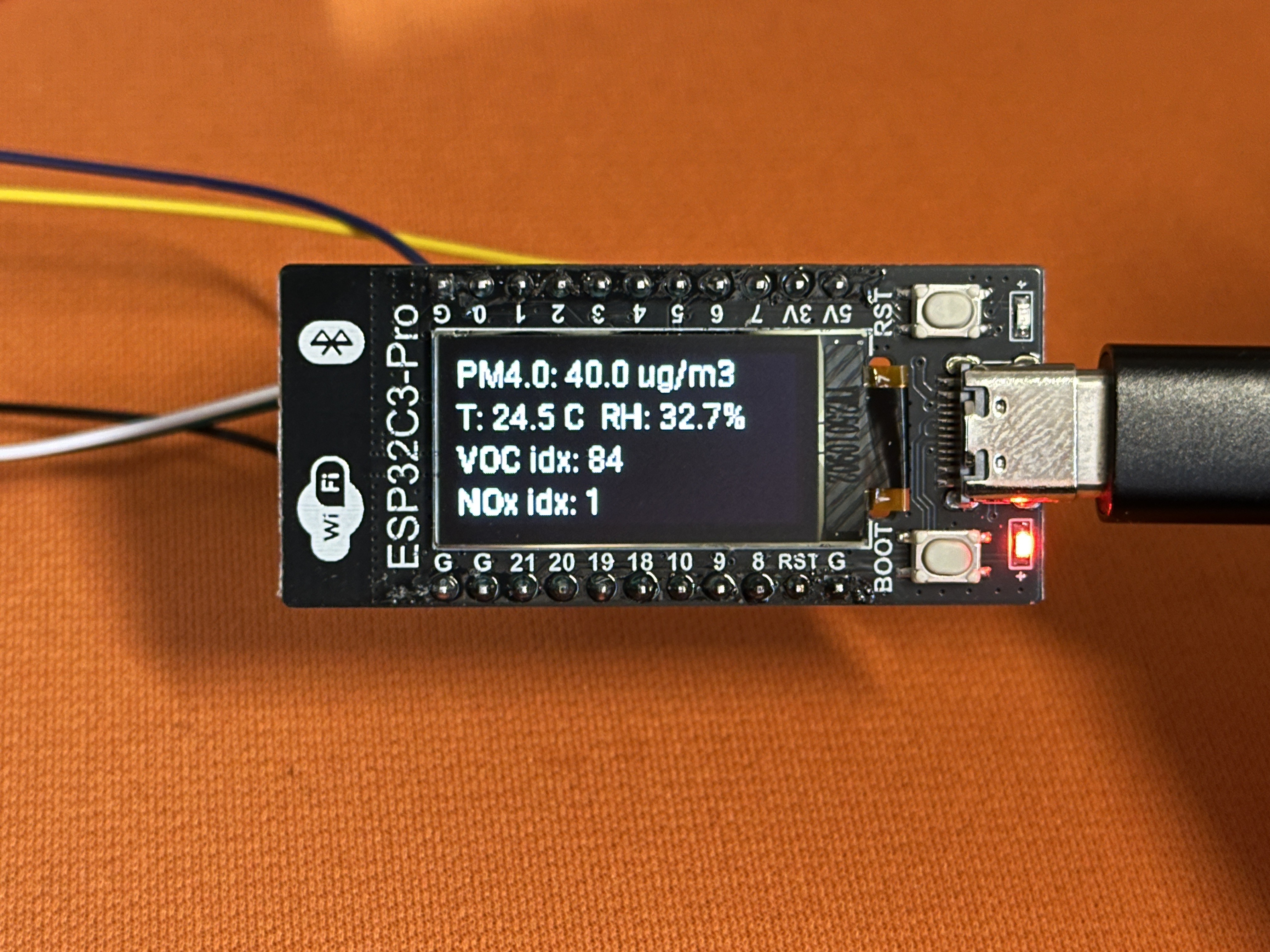
    <p><strong>Key Feature:</strong> Integrated <strong>0.96” OLED (128×64, SSD1306)</strong>.</p>
  </li>
</ul>

<p><img src="/images/IMG_1053.jpg" alt="Close-up" /></p>

<p>The onboard OLED is the reason this board was attractive. It removes the extra wiring normally needed for a display, while the ESP32 handles Wi-Fi, firmware, and Home Assistant communication. I only needed to attach the external sensor to the I2C bus. The board was also cheap, roughly $3 USD.</p>

<h3 id="b-the-sensor-sensirion-sen55-sdn-t">B. The Sensor: Sensirion SEN55-SDN-T</h3>

<p>The star of the show. The SEN55 module is an industrial-grade “all-in-one” package:</p>

<ul>
  <li>
    <p>PM1.0 / 2.5 / 4.0 / 10</p>
  </li>
  <li>
    <p>Temperature &amp; Relative Humidity</p>
  </li>
  <li>
    <p>VOC Index (Volatile Organic Compounds)</p>
  </li>
  <li>
    <p>NOx Index (Nitrogen Oxides)</p>
  </li>
</ul>

<p>Unlike simple passive sensors, the SEN55 has an integrated fan for active airflow. I bought the <strong>SDN-T</strong> version, which comes soldered to a breakout board with voltage regulation and pull-up resistors, using a <strong>GH1.25 6P</strong> interface. It costs around $28 USD and is the only expensive part of this build.</p>

<h3 id="c-the-cable-gh125-to-254mm-dupont">C. The Cable: GH1.25 to 2.54mm DuPont</h3>

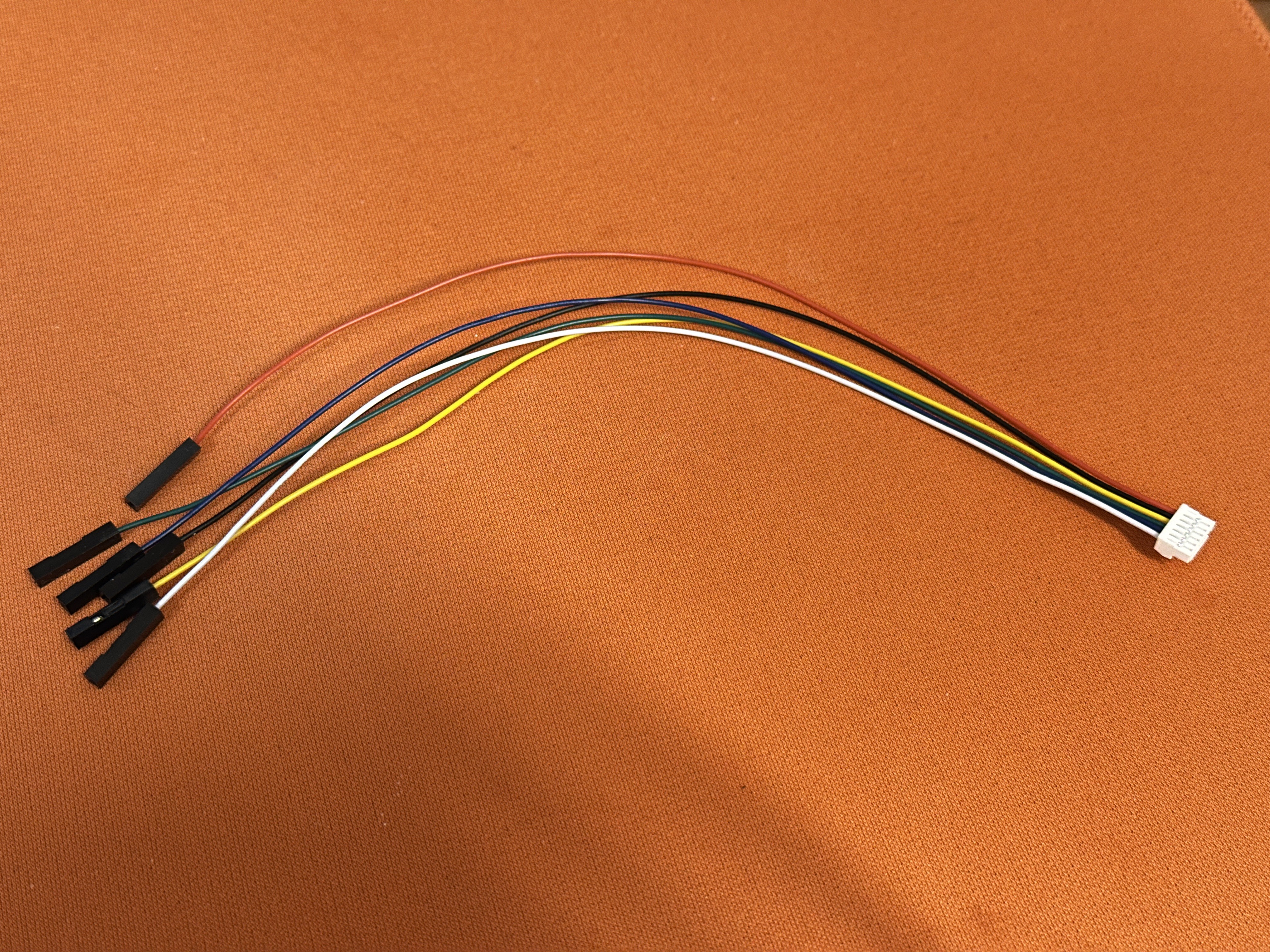
<p>The sensor uses a tiny GH1.25 socket, while the ESP32 uses standard 2.54mm headers. To avoid soldering or crimping (and the resulting headaches), I bought a pre-made adapter cable:</p>

<ul>
  <li>
    <p><strong>End A:</strong> GH1.25 6P plug (for the sensor).</p>
  </li>
  <li>
    <p><strong>End B:</strong> 6x DuPont female connectors (for the ESP32).</p>
  </li>
</ul>

<p>That cable turned the sensor connection into a simple “rainbow tail” instead of a soldering job.</p>

<p><img src="/images/IMG_1054.jpg" alt="cable adapter" /></p>

<hr />

<h2 id="2-wiring">2. Wiring</h2>

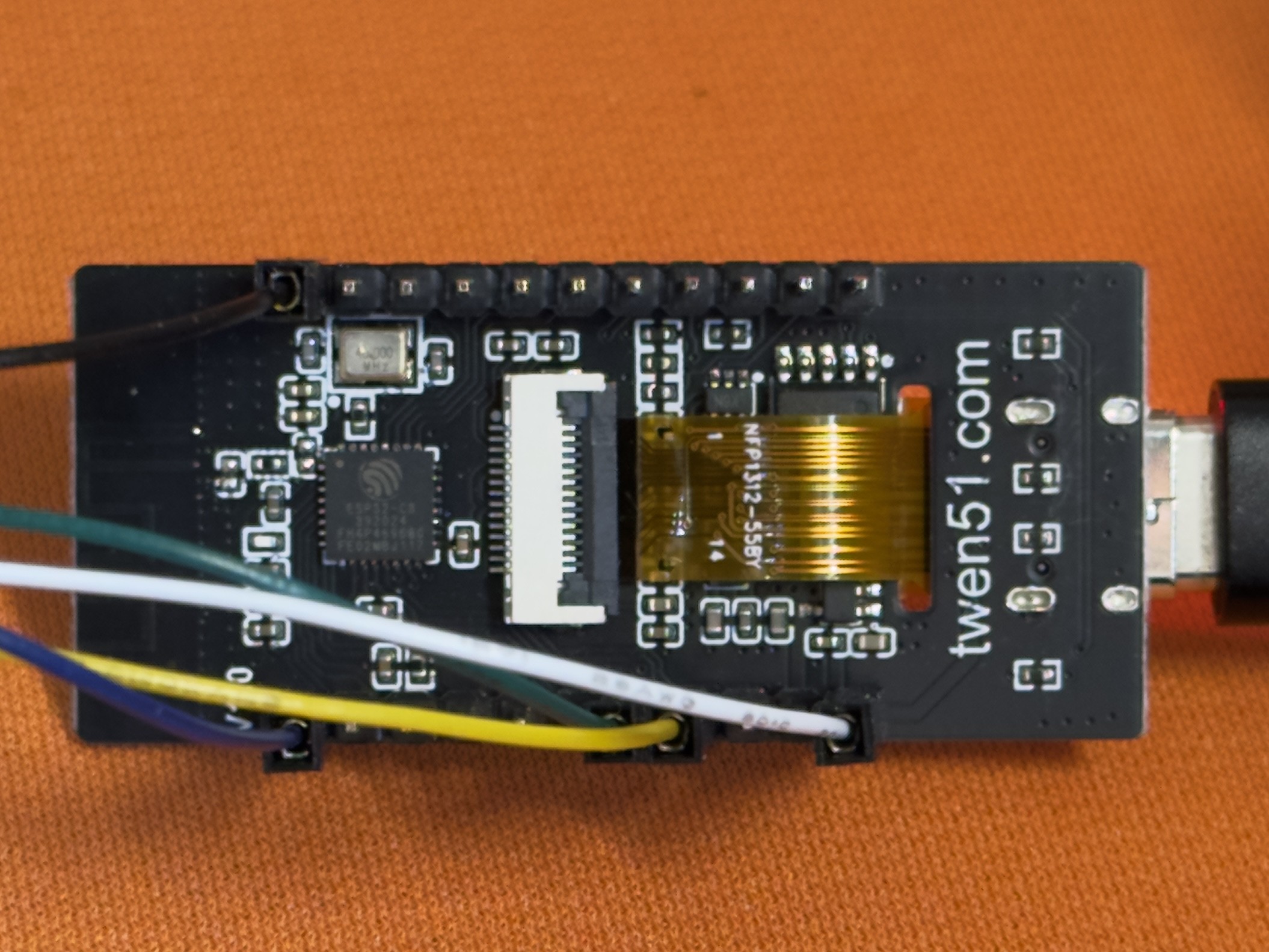
<p>The wiring is simple if you trust the SEN55 breakout-board silkscreen and do not assume the ESP32-C3 board uses the same I2C pins as every other C3 board.</p>

<p><img src="/images/IMG_1052.jpg" alt="actual wiring" /></p>

<table>
  <thead>
    <tr>
      <th><strong>SEN55 Pin</strong></th>
      <th><strong>ESP32-C3 Pin</strong></th>
      <th><strong>Note</strong></th>
    </tr>
  </thead>
  <tbody>
    <tr>
      <td><strong>VCC / VIN</strong></td>
      <td><strong>5V</strong></td>
      <td>SEN55 needs 5V for the fan</td>
    </tr>
    <tr>
      <td><strong>GND</strong></td>
      <td><strong>GND</strong></td>
      <td>Ground</td>
    </tr>
    <tr>
      <td><strong>SDA</strong></td>
      <td><strong>GPIO 5</strong></td>
      <td>I2C Data</td>
    </tr>
    <tr>
      <td><strong>SCL</strong></td>
      <td><strong>GPIO 6</strong></td>
      <td>I2C Clock</td>
    </tr>
    <tr>
      <td>SEL / NC</td>
      <td>N/A</td>
      <td>Leave floating</td>
    </tr>
  </tbody>
</table>

<p><strong>Note on I2C pins:</strong> this is where the build became tricky. On this specific C3-PRO board, the useful I2C bus is on GPIO 5 and 6, not the GPIO 8 and 9 pair often seen on other ESP32-C3 boards.</p>

<hr />

<h2 id="3-debugging-the-black-oled-screen">3. Debugging The Black OLED Screen</h2>

<p>The first firmware flash was only half successful. Sensor data appeared in the logs, which meant the SEN55 path was alive, but the <strong>OLED screen stayed black</strong>. That made the problem narrower: power was fine, the ESP32 was booting, and at least part of the I2C setup worked, but the display was not being addressed correctly.</p>

<p>The debugging path was:</p>

<ol>
  <li>
    <p><strong>The “Generic” Trap:</strong> I initially assumed the I2C pins were GPIO 8 (SDA) and 9 (SCL), which is common for ESP32-C3. The log showed <code class="language-plaintext highlighter-rouge">[I2C] Bus scan... No devices found</code>.</p>
  </li>
  <li>
    <p><strong>Finding the Pins:</strong> After inspecting the board layout and consulting community documentation (LuatOS/WeAct styles), I discovered this specific form factor uses <strong>GPIO 5 (SDA)</strong> and <strong>GPIO 6 (SCL)</strong>.</p>
  </li>
  <li>
    <p><strong>The Driver Mismatch:</strong> Even with the correct pins, the screen wouldn’t turn on. I tried the <code class="language-plaintext highlighter-rouge">SSD1306</code> driver, then the <code class="language-plaintext highlighter-rouge">SH1106</code> driver.</p>
  </li>
  <li>
    <p><strong>The Reset Pin Mystery:</strong> Some boards require a manual reset pin definition (often GPIO 7 or 10). I tried toggling these in the YAML config.</p>
  </li>
  <li>
    <p><strong>The Solution:</strong> It turned out to be a combination of using <strong>GPIO 5/6</strong> for I2C and ensuring the correct <strong>SSD1306</strong> model definition. Once I corrected the pins in the <code class="language-plaintext highlighter-rouge">i2c</code> section, the screen sprang to life.</p>
  </li>
</ol>

<p>The lesson is simple: never trust default pinouts for unbranded dev boards. Check the schematic if you can, and let the I2C scan tell you what the board is actually doing.</p>

<hr />

<h2 id="4-software-esphome-yaml">4. Software: ESPHome YAML</h2>

<p>I used ESPHome because it keeps the firmware path short: write YAML, flash the board, and let Home Assistant discover the device through the native API.</p>

<h3 id="prerequisites">Prerequisites</h3>

<ol>
  <li>Install Python 3.11+.</li>
  <li>Install ESPHome: <code class="language-plaintext highlighter-rouge">pip install esphome</code>.</li>
  <li>Create the config file and run: <code class="language-plaintext highlighter-rouge">esphome run air-monitor.yaml</code>.</li>
</ol>

<h3 id="the-complete-configuration">The Complete Configuration</h3>

<p>Here is the final working YAML. The display lambda rotates through the four PM readings on the first line every five seconds, while temperature, humidity, VOC, and NOx stay visible.</p>

<div class="language-yaml highlighter-rouge"><div class="highlight"><pre class="highlight"><code><span class="na">esphome</span><span class="pi">:</span>
  <span class="na">name</span><span class="pi">:</span> <span class="s">twen-esp32c3-pro</span>
  <span class="na">friendly_name</span><span class="pi">:</span> <span class="s">Twen ESP32C3 Pro Air Monitor</span>
  <span class="na">on_boot</span><span class="pi">:</span>
    <span class="na">priority</span><span class="pi">:</span> <span class="m">600</span>
    <span class="na">then</span><span class="pi">:</span>
      <span class="pi">-</span> <span class="na">logger.log</span><span class="pi">:</span> <span class="s2">"</span><span class="s">===</span><span class="nv"> </span><span class="s">ESP32C3</span><span class="nv"> </span><span class="s">BOOTED</span><span class="nv"> </span><span class="s">==="</span>

<span class="na">esp32</span><span class="pi">:</span>
  <span class="na">board</span><span class="pi">:</span> <span class="s">esp32-c3-devkitm-1</span>
  <span class="na">variant</span><span class="pi">:</span> <span class="s">esp32c3</span>
  <span class="na">framework</span><span class="pi">:</span>
    <span class="na">type</span><span class="pi">:</span> <span class="s">esp-idf</span>

<span class="na">logger</span><span class="pi">:</span>
  <span class="na">level</span><span class="pi">:</span> <span class="s">DEBUG</span>
  <span class="na">baud_rate</span><span class="pi">:</span> <span class="m">115200</span>

<span class="na">api</span><span class="pi">:</span>
  <span class="na">encryption</span><span class="pi">:</span>
    <span class="na">key</span><span class="pi">:</span> <span class="s2">"</span><span class="s">YOUR_ENCRYPTION_KEY_HERE"</span>

<span class="na">ota</span><span class="pi">:</span>
  <span class="na">platform</span><span class="pi">:</span> <span class="s">esphome</span>
  <span class="na">password</span><span class="pi">:</span> <span class="s2">"</span><span class="s">YOUR_OTA_PASSWORD_HERE"</span>

<span class="na">wifi</span><span class="pi">:</span>
  <span class="na">ssid</span><span class="pi">:</span> <span class="s2">"</span><span class="s">YOUR_WIFI_SSID"</span>
  <span class="na">password</span><span class="pi">:</span> <span class="s2">"</span><span class="s">YOUR_WIFI_PASSWORD"</span>

  <span class="na">ap</span><span class="pi">:</span>
    <span class="na">ssid</span><span class="pi">:</span> <span class="s2">"</span><span class="s">ESP32C3-Pro</span><span class="nv"> </span><span class="s">Fallback"</span>
    <span class="na">password</span><span class="pi">:</span> <span class="s2">"</span><span class="s">password123"</span>

<span class="na">captive_portal</span><span class="pi">:</span>

<span class="na">web_server</span><span class="pi">:</span>
  <span class="na">port</span><span class="pi">:</span> <span class="m">80</span>

<span class="c1"># ----------------- I2C Bus -----------------</span>
<span class="c1"># Crucial: GPIO 5 and 6 for this specific board!</span>
<span class="na">i2c</span><span class="pi">:</span>
  <span class="na">id</span><span class="pi">:</span> <span class="s">bus_a</span>
  <span class="na">sda</span><span class="pi">:</span> <span class="s">GPIO5</span>
  <span class="na">scl</span><span class="pi">:</span> <span class="s">GPIO6</span>
  <span class="na">scan</span><span class="pi">:</span> <span class="no">true</span>
  <span class="na">frequency</span><span class="pi">:</span> <span class="s">100kHz</span>

<span class="c1"># ----------------- Fonts -----------------</span>
<span class="na">font</span><span class="pi">:</span>
  <span class="pi">-</span> <span class="na">file</span><span class="pi">:</span> <span class="s2">"</span><span class="s">gfonts://Roboto"</span>
    <span class="na">id</span><span class="pi">:</span> <span class="s">font_small</span>
    <span class="na">size</span><span class="pi">:</span> <span class="m">12</span>

<span class="c1"># ----------------- Sensors -----------------</span>
<span class="na">sensor</span><span class="pi">:</span>
  <span class="pi">-</span> <span class="na">platform</span><span class="pi">:</span> <span class="s">wifi_signal</span>
    <span class="na">id</span><span class="pi">:</span> <span class="s">wifi_rssi</span>
    <span class="na">name</span><span class="pi">:</span> <span class="s2">"</span><span class="s">WiFi</span><span class="nv"> </span><span class="s">Signal"</span>
    <span class="na">update_interval</span><span class="pi">:</span> <span class="s">60s</span>

  <span class="pi">-</span> <span class="na">platform</span><span class="pi">:</span> <span class="s">sen5x</span>
    <span class="na">i2c_id</span><span class="pi">:</span> <span class="s">bus_a</span>
    <span class="na">address</span><span class="pi">:</span> <span class="s">0x69</span>
    <span class="na">update_interval</span><span class="pi">:</span> <span class="s">10s</span>
    <span class="c1"># PM Sensors</span>
    <span class="na">pm_1_0</span><span class="pi">:</span>
      <span class="na">id</span><span class="pi">:</span> <span class="s">sen55_pm10</span>
      <span class="na">name</span><span class="pi">:</span> <span class="s2">"</span><span class="s">SEN55</span><span class="nv"> </span><span class="s">PM1.0"</span>
    <span class="na">pm_2_5</span><span class="pi">:</span>
      <span class="na">id</span><span class="pi">:</span> <span class="s">sen55_pm25</span>
      <span class="na">name</span><span class="pi">:</span> <span class="s2">"</span><span class="s">SEN55</span><span class="nv"> </span><span class="s">PM2.5"</span>
    <span class="na">pm_4_0</span><span class="pi">:</span>
      <span class="na">id</span><span class="pi">:</span> <span class="s">sen55_pm40</span>
      <span class="na">name</span><span class="pi">:</span> <span class="s2">"</span><span class="s">SEN55</span><span class="nv"> </span><span class="s">PM4.0"</span>
    <span class="na">pm_10_0</span><span class="pi">:</span>
      <span class="na">id</span><span class="pi">:</span> <span class="s">sen55_pm100</span>
      <span class="na">name</span><span class="pi">:</span> <span class="s2">"</span><span class="s">SEN55</span><span class="nv"> </span><span class="s">PM10"</span>
    <span class="c1"># Climate</span>
    <span class="na">temperature</span><span class="pi">:</span>
      <span class="na">id</span><span class="pi">:</span> <span class="s">sen55_temp</span>
      <span class="na">name</span><span class="pi">:</span> <span class="s2">"</span><span class="s">SEN55</span><span class="nv"> </span><span class="s">Temperature"</span>
    <span class="na">humidity</span><span class="pi">:</span>
      <span class="na">id</span><span class="pi">:</span> <span class="s">sen55_hum</span>
      <span class="na">name</span><span class="pi">:</span> <span class="s2">"</span><span class="s">SEN55</span><span class="nv"> </span><span class="s">Humidity"</span>
    <span class="c1"># Gas Indices</span>
    <span class="na">voc</span><span class="pi">:</span>
      <span class="na">id</span><span class="pi">:</span> <span class="s">sen55_voc</span>
      <span class="na">name</span><span class="pi">:</span> <span class="s2">"</span><span class="s">SEN55</span><span class="nv"> </span><span class="s">VOC</span><span class="nv"> </span><span class="s">Index"</span>
    <span class="na">nox</span><span class="pi">:</span>
      <span class="na">id</span><span class="pi">:</span> <span class="s">sen55_nox</span>
      <span class="na">name</span><span class="pi">:</span> <span class="s2">"</span><span class="s">SEN55</span><span class="nv"> </span><span class="s">NOx</span><span class="nv"> </span><span class="s">Index"</span>

<span class="c1"># ----------------- Display Logic -----------------</span>
<span class="na">display</span><span class="pi">:</span>
  <span class="pi">-</span> <span class="na">platform</span><span class="pi">:</span> <span class="s">ssd1306_i2c</span>
    <span class="na">id</span><span class="pi">:</span> <span class="s">oled</span>
    <span class="na">i2c_id</span><span class="pi">:</span> <span class="s">bus_a</span>
    <span class="na">model</span><span class="pi">:</span> <span class="s2">"</span><span class="s">SSD1306</span><span class="nv"> </span><span class="s">128x64"</span>
    <span class="na">address</span><span class="pi">:</span> <span class="s">0x3C</span>
    <span class="na">rotation</span><span class="pi">:</span> <span class="m">0</span>
    <span class="na">flip_y</span><span class="pi">:</span> <span class="s">False</span>
    <span class="na">lambda</span><span class="pi">:</span> <span class="pi">|-</span>
      <span class="s">it.fill(Color::BLACK);</span>

      <span class="s">// --- Line 1: Auto-Carousel for PM values ---</span>
      <span class="s">static uint32_t last_switch = 0;</span>
      <span class="s">static int page = 0;</span>
      <span class="s">uint32_t now = millis();</span>
      
      <span class="s">// Switch page every 5000ms (5 seconds)</span>
      <span class="s">if (now - last_switch &gt; 5000) {</span>
        <span class="s">page = (page + 1) % 4; // Cycles 0 -&gt; 1 -&gt; 2 -&gt; 3</span>
        <span class="s">last_switch = now;</span>
      <span class="s">}</span>

      <span class="s">// Check if sensors have data before printing</span>
      <span class="s">if (id(sen55_pm10).has_state()) {</span>
        <span class="s">if (page == 0) {</span>
          <span class="s">it.printf(0, 0, id(font_small), "PM1.0 : %.1f ug/m3", id(sen55_pm10).state);</span>
        <span class="s">} else if (page == 1) {</span>
          <span class="s">it.printf(0, 0, id(font_small), "PM2.5 : %.1f ug/m3", id(sen55_pm25).state);</span>
        <span class="s">} else if (page == 2) {</span>
          <span class="s">it.printf(0, 0, id(font_small), "PM4.0 : %.1f ug/m3", id(sen55_pm40).state);</span>
        <span class="s">} else {</span>
          <span class="s">it.printf(0, 0, id(font_small), "PM10  : %.1f ug/m3", id(sen55_pm100).state);</span>
        <span class="s">}</span>
      <span class="s">} else {</span>
        <span class="s">it.printf(0, 0, id(font_small), "PM: --");</span>
      <span class="s">}</span>

      <span class="s">// --- Line 2: Temp + Humidity ---</span>
      <span class="s">if (id(sen55_temp).has_state() &amp;&amp; id(sen55_hum).has_state()) {</span>
        <span class="s">it.printf(0, 16, id(font_small), "T: %.1f C  RH: %.1f%%",</span>
                  <span class="s">id(sen55_temp).state, id(sen55_hum).state);</span>
      <span class="s">} else {</span>
        <span class="s">it.printf(0, 16, id(font_small), "T/RH: --");</span>
      <span class="s">}</span>

      <span class="s">// --- Line 3: VOC Index ---</span>
      <span class="s">if (id(sen55_voc).has_state()) {</span>
        <span class="s">it.printf(0, 32, id(font_small), "VOC idx: %.0f", id(sen55_voc).state);</span>
      <span class="s">} else {</span>
        <span class="s">it.printf(0, 32, id(font_small), "VOC idx: --");</span>
      <span class="s">}</span>

      <span class="s">// --- Line 4: NOx Index ---</span>
      <span class="s">if (id(sen55_nox).has_state()) {</span>
        <span class="s">it.printf(0, 48, id(font_small), "NOx idx: %.0f", id(sen55_nox).state);</span>
      <span class="s">} else {</span>
        <span class="s">it.printf(0, 48, id(font_small), "NOx idx: --");</span>
      <span class="s">}</span>
</code></pre></div></div>

<hr />

<h2 id="5-how-it-performs">5. How it Performs</h2>

<p>On boot, the I2C scan should detect <strong>0x3C</strong> for the OLED and <strong>0x69</strong> for the SEN55.</p>

<p><strong>The Sensor Behavior:</strong></p>

<ul>
  <li>
    <p><strong>Auto-Cleaning:</strong> The SEN55 runs a fan cleaning cycle every 7 days (604,800s).</p>
  </li>
  <li>
    <p><strong>Warm-up:</strong> For the first ~10 seconds after power-on, the NOx index might output <code class="language-plaintext highlighter-rouge">0xFFFF</code> (invalid). This is documented behavior; just give it a moment.</p>
  </li>
  <li>
    <p><strong>Sensitivity:</strong> The VOC index reacts quickly to everyday changes. Cooking, opening a window, or changing airflow can produce visible jumps.</p>
  </li>
</ul>

<p>The display layout is intentionally simple. Temperature, humidity, VOC, and NOx stay in fixed positions, while PM1.0, PM2.5, PM4.0, and PM10 rotate through the top line. That keeps the tiny 128×64 screen useful without turning it into a wall of numbers.</p>

<hr />

<h2 id="6-home-assistant-integration">6. Home Assistant Integration</h2>

<p>Because the ESPHome <code class="language-plaintext highlighter-rouge">api:</code> block is enabled, Home Assistant can discover the device and add all the exposed sensors.</p>

<ol>
  <li>Open Home Assistant.</li>
  <li>It should auto-discover “Twen ESP32C3 Pro”.</li>
  <li>Click Configure and enter the encryption key.</li>
</ol>

<p>After that, the more interesting work happens in dashboards and automations: plotting PM and VOC trends, comparing rooms, and checking whether ventilation changes actually show up in the data.</p>

<hr />

<h2 id="7-conclusion">7. Conclusion</h2>

<p>This build hit the target I cared about: a cheap, inspectable monitor that reports the air-quality signals I wanted and feeds them into Home Assistant.</p>

<p><strong>What worked well:</strong></p>

<ul>
  <li><strong>Cost:</strong> about $30 total, with the SEN55 taking almost the whole budget.</li>
  <li><strong>Build complexity:</strong> no soldering was required because the adapter cable matched the sensor and dev board.</li>
  <li><strong>Software:</strong> ESPHome made iteration and Home Assistant integration straightforward.</li>
  <li><strong>Size:</strong> the hardware is small enough to move around the room while testing placement.</li>
</ul>

<p><strong>Limitations:</strong></p>

<ul>
  <li><strong>Aesthetics:</strong> without a case, it is still a bare-board prototype with visible wiring.</li>
  <li><strong>Power:</strong> the SEN55 fan draws enough current that this is a USB-C powered build, not a battery project.</li>
  <li><strong>Measurement scope:</strong> VOC and NOx are relative indices from 0 to 500, not absolute PPB concentrations. They are useful for trends, not lab-grade analysis.</li>
</ul>

<p><strong>Next improvements:</strong></p>

<ul>
  <li>Designing and 3D printing a proper case with airflow channels.</li>
  <li>Adding a capacitive touch button to manually toggle screens.</li>
  <li>Enabling Bluetooth Proxy on the ESP32 to track other BLE devices in the room.</li>
</ul>

<p>The main takeaway is that the hard part was not the sensor or the YAML. It was identifying the board-specific I2C wiring. Once that was correct, the rest of the stack behaved predictably.</p>]]></content><author><name></name></author><category term="diy" /><summary type="html"><![CDATA[A practical ESP32-C3, SEN55, and ESPHome build with wiring notes, Home Assistant integration, and the debugging path for a black OLED screen.]]></summary></entry></feed>